When submitting a Classified, you must decide whether you want RDC to create a dedicated public discussion for your listing.
Neither option is selected for you.
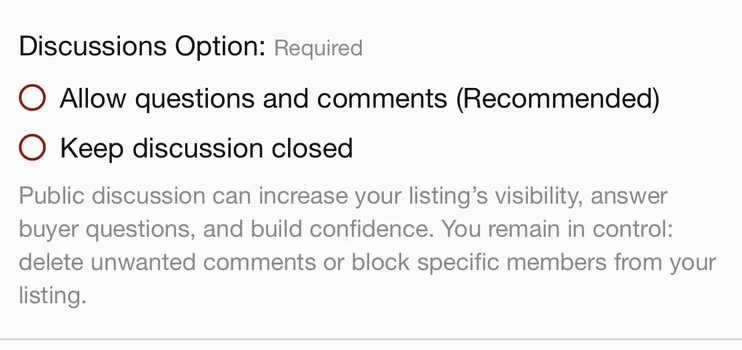
You choose:
○ Allow questions and comments (Recommended)
or
○ Keep discussion closed
Enabling discussion creates a dedicated public discussion for your listing in
Let's Talk Classifieds and adds the
Discussion tab to your Classified.
[SCREENSHOT: Classified showing Discussion tab]
RDC members can ask questions, make comments, add information and publicly discuss what you are selling.
Pros:
- More exposure. Active discussions naturally move up in Let's Talk Classifieds as members reply. If people are talking about your listing, more people are likely to see it.
- Answer once, publicly. A buyer may ask something that ten other people were wondering about. Your answer becomes useful to everyone viewing the discussion.
- Build confidence. Openly answering questions gives potential buyers additional information about the item and the seller.
- Community knowledge. RDC has a lot of knowledgeable people. Sometimes the discussion itself adds useful history, technical information or context to a listing.
And yes...people may talk shit.
That's part of allowing a public discussion.
If you enable discussion, RDC gives you additional moderation control over the discussion attached to your Classified.
You can:
- Delete unwanted replies from your discussion.
- Block a specific member from participating in your discussion.
You
cannot edit what another member wrote.
In other words, you can remove someone's contribution or prevent that person from continuing to participate, but you cannot change their words.
Giving the listing owner moderation tools does not mean RDC staff are hands-off.
Classified discussions remain subject to normal RDC community moderation.
RDC has historically been fairly thick-skinned about words, opinions, disagreement and people giving each other shit. But there is still a line.
If something becomes outright abusive, completely inappropriate, spam, or otherwise something we would moderate elsewhere in the regular RDC community, moderators may intervene here as well.
Your moderation tools supplement RDC moderation. They do not replace it.
We obviously cannot guarantee that a moderator will see something before you do.
Don't want a dedicated public discussion attached to your Classified?
Select:
○ Keep discussion closed
Your Classified remains a Classified. Buyers can still view it and use the contact methods you provide.
There will be no
Discussion tab for your listing and no corresponding thread created for it in
Let's Talk Classifieds.
This does
not mean your listing cannot be discussed.
RDC members may still mention, link to or discuss your listing elsewhere on RDC — just as anyone may discuss or share a publicly available listing elsewhere on the internet.
Choosing
Keep discussion closed simply means RDC will not create a dedicated discussion thread attached to your listing.
Pro: Your Classified itself stays focused on the information you published and direct communication with potential buyers.
Con: You give up the dedicated discussion, community interaction and potential additional exposure that an active Classified discussion can create.
Discussion ON → RDC creates a dedicated public discussion attached to your Classified.
More openness, interaction, questions and potential exposure.
Discussion OFF → RDC does not create a dedicated public discussion attached to your Classified.
More control over the Classified itself and less noise directly attached to your listing.
It does not determine whether people may talk about your listing elsewhere.
Neither option is mandatory. Making the choice is.